
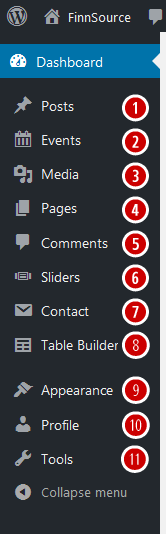
As an Editor, you will have access to more site functions than does a “Subscriber”, “Contributor” or “Author” but have fewer abilities than would an “Administrator”. An Editor is assigned access to the following capabilities:
1. POSTS: This is where you can select the Post or Posts you wish to create, edit, delete, or view. Multiple Posts can be selected for deletion and for editing. You can also update your Categories and Post Tags.
2. EVENTS: This provides access to the Events Calendar plugin.
3. MEDIA: This is where all your uploaded images, documents or other media files are stored. You can browse through your Media library, as well as edit and update the files.
4. PAGES: This is where you create and maintain all your Pages. Which are most often used to present “static” information about the site; Pages are typically “timeless” in nature, e.g., “About” or “Contact” Pages.
5. COMMENTS: You can manage all your Comments within this section. At the present time, FinnSource does not enable Comments within any of its Posts or on its Pages.
6. SLIDERS: This provides access to the Sliders plugin.
7. CONTACT: You can create and manage Contact Forms here.
8. TABLE BUILDER: Plug-in for table-centric content.
9. APPEARANCE: The only access an Editor has to the site Appearance at the present time is to the Shortcode Generator.
10. PROFILE: Manage your personal Profile here.
11. TOOLS: By default, the Editor does not have access to any Tools. However, if needed, the Administrator can later assign certain Tools (e.g. exporting backup files) to a specific Editor.